YouTube Clipper: Turning Long Videos Into Clips People Actually Share
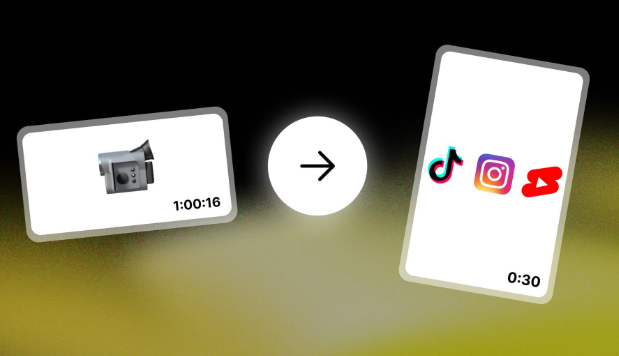
A three-hour podcast episode gets watched all the way through by maybe a few thousand people. The forty-second clip pulled from minute 47, where the guest says something sharp and unexpected, gets watched by millions. That gap between the full upload and the moment worth sharing is exactly what YouTube Clipper is built to close.
It’s a browser-based tool: paste a YouTube link, mark the start and end of the segment you want, and export it as its own file. No software to install, no account wall blocking the first few tries, and no watermark stamped across the footage. For anyone who works with video on a daily basis — podcasters, news editors, highlight-reel makers, language teachers pulling short segments for a lesson — that combination of speed and simplicity is the whole appeal.
What the Tool Actually Does
Strip away the branding and YouTube Clipper is doing three jobs at once. First, it trims a video down to a chosen time range, which sounds trivial until you’ve tried to do it by hand in a heavier editor and lost twenty minutes to render times. Second, it converts that trimmed segment into a downloadable MP4, sized appropriately for whatever platform it’s headed to next. Third, for people who only need the audio — a quote for a podcast recap, a soundbite for a radio segment — it will export straight to MP3, skipping the video track entirely.
None of these are individually rare features. What’s less common is having all three live in one interface with no learning curve. A user who has never edited video before can go from ‘I saw a clip I liked’ to ‘I have my own version downloaded’ in under two minutes, and that low barrier to entry is why the tool has found an audience well beyond professional editors.
See also: How Golf Carts Fit Into Busy And Dynamic Lifestyles?
Why Clipping Has Become Its Own Skill
Short-form platforms rewarded a specific instinct: knowing which fifteen seconds of a longer piece of content will actually stop someone’s thumb mid-scroll. Creators who built audiences on TikTok, Instagram Reels, and YouTube Shorts figured this out early, and a lot of them didn’t build that audience from original footage — they built it by re-cutting interviews, gaming streams, and old talk-show clips into something punchier than the source material.
That’s the gap YouTube Clipper sits in. It’s not trying to replace a full editing suite, and it doesn’t pretend to. It’s aimed at the specific, repeatable task of isolating a moment and getting it into a shareable format fast, which is what most clipping accounts actually need on a daily basis. A creator running three or four social accounts off one long-form source doesn’t want a project file and a render queue — they want the clip, downloaded, before the trend they’re riding has moved on to something else.
Built for a Global Audience
One detail worth noting: the tool isn’t designed around a single region or language. Videos in English, Spanish, Korean, Hindi, and dozens of other languages all pass through the same clipping process, and the interface itself stays in plain, universal English rather than leaning on region-specific slang or assumptions. For a platform whose whole audience is spread across time zones and content niches, that neutrality matters more than it might seem — a user in Manila and a user in Madrid should hit the same clean workflow without translation friction.
It also means the tool doesn’t discriminate by content category. Gaming montages, cooking demonstrations, political commentary, sports highlights, and classroom lectures all get treated the same way: paste the link, set the range, download the file. That category-agnostic design is part of why it’s shown up as a recommendation across such different corners of the internet — a gaming forum and a language-learning subreddit can both point to the same tool for entirely different reasons.
The Practical Limits
It’s worth being upfront about what a browser-based clipper isn’t. It won’t add captions, layer in music, or handle the kind of multi-track editing a polished YouTube Short often needs before it goes out. Anyone building a serious content pipeline will still end up in a proper editor for the finishing touches — text overlays, color correction, pacing adjustments. What YouTube Clipper handles is the first, most time-consuming step: getting the raw footage isolated and out of the original video without friction.
There’s also the standing reminder that comes with any download tool built around someone else’s platform: respect the source. Clipping a video for personal use, commentary, or fair-use style re-editing is one thing; re-uploading someone else’s full work as your own is a different problem entirely, and one that copyright takedowns exist to catch. The tool makes extraction easy; it doesn’t make the ethics of reuse someone else’s job.
Where It Fits
The honest way to think about YouTube Clipper is as a utility rather than a destination — the kind of site you keep a tab open for rather than one you browse. A podcast producer pulling the week’s best five-minute segment before the full episode drops. A teacher isolating a two-minute demonstration from a forty-minute lecture. A sports account grabbing a goal the instant it happens, before the highlight is stale. None of these are complicated editing jobs. They’re extraction jobs, done fast, done free, and done without an account wall in the way.
That’s a narrower promise than most video tools make, and it’s probably why it’s kept its footing: it does one thing — cutting a clip out of a longer YouTube video and handing it back as MP4 or MP3 — and it does it without asking for much in return.